
Free event rooms for the life of the event
Make your room. Share the link. Enjoy together.
A private group room for trips, parties, dinners, projects, and pop-up plans. Chat, vote, list, split, schedule, and run a live photo wall without another app.
No app install. No accounts. One link.
The problem
Group events get messy fast
Chat, polls, lists, expenses, flights, and rides end up scattered across too many apps.
WhatsApp or iMessage
Decisions get buried.
Separate polls
Votes live in another tab.
Notes checklists
Nobody knows who owns what.
Expense apps
Costs get sorted out later.
Flight screenshots
Arrival times vanish in the scroll.
Ride confusion
Who is driving? Who needs a lift?
The simpler alternative
One room link. Everything in one place.
cht.so gives your group one room for the whole event: plan together, share updates as it happens, and bring the moment to life with a live photo wall.
Chat stays useful
Messages stay next to the plan.
Plans stay visible
Agenda, flights, cars, and lists are easy to find.
Costs stay clear
Split expenses before people forget.
How it works
Create. Share. Use live.
Create a room
Pick a name and start free.
Share the link
Send one link to everyone.
Plan together
Chat, vote, list, split, and schedule in one room.
Use cases
Start with a room for...
Pick a room idea, then make it yours.
Features
Everything your group needs before and during the event
Bring the right stuff
Assign drinks, snacks, tickets, chargers, decorations, and anything easy to forget.
Decide faster
Vote on dates, dinner spots, activities, music, or rides.
Keep the plan visible
The agenda stays where everyone can find it.
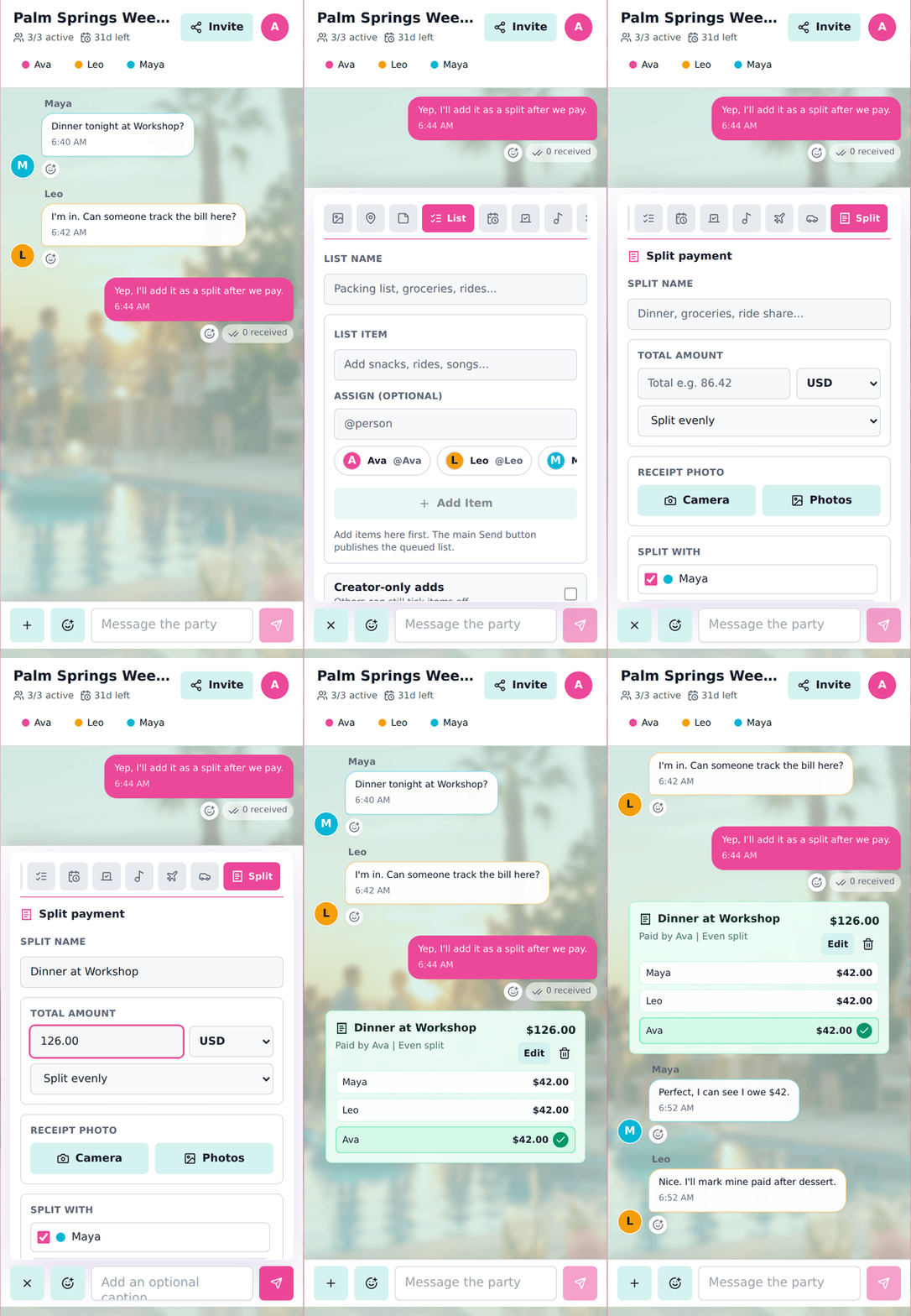
Split costs
Track who paid, who owes, and handle multiple currencies.
Track arrivals
Keep flight details out of the chat scroll.
Sort out rides
See drivers, seats, passengers, and pickup points.
Build the playlist
Let the group shape the music before and during the event.
Run a photo wall
Turn shared photos into a fullscreen live wall with reactions, favorites, and new-photo moments.
Make it yours
Add colors and backgrounds that match the event.
Event room ideas
Find the right room for your event
Scenario pages with real app screenshots and the main feature each group is likely to use first.
Why not just WhatsApp?
WhatsApp is for chat. cht.so is for the plan.
Keep the group moving without buried decisions, missing lists, or separate expense apps.
No friction
Free. No app install. Built around the event.
Create a room, share the link, use it before and during the event, then close it when you are done.
Free to use
Create and share a room without paying.
No app install
Guests join in the browser.
Event-lived rooms
Use it before and during the event, then close it when you are done.
Built for real group plans
For plans that do not need another app
Built for trips, parties, festivals, birthdays, dinners, student events, and quick pop-up groups.
Make a room for your next event
Create a free room for your next event.
One link for chat, plans, photos, live photo wall, polls, lists, agenda, expenses, rides, and music.